Why you don’t want to miss the August Atlanta Cutters Meeting

Ok, so Digital Asset Management is the topic.  Some of you might be thinking “well that’s not nearly as sexy as having the ‘four A’s’ on stage at the same time like you did last month.” No, quite honestly it’s not but if anything, this month is even MORE important to the stability and longevity of your work.   Whether you shoot / edit tape or digital cards, we are in a digital world and how you protect those digital assets for the long haul will literally make or break you.

As many of you know, I’ve been a forum host on the CreativeCow.net communities since 2001.   If I had to pick ONE topic that comes up more than any other, year in, year out, it’s storage.   In fact I believe I’ve tested and reviewed more storage products than anything else in the 10 years I’ve been writing for the Cow.

Post always starts off with, “I’m about to start a new project / build a new system / open a new facility and I’m just not sure what storage to buy.” There are literally hundreds of storage combinations out there these days, it’s a veritable alphabet soup of FW, eSATA, USB, SAS, iSCSI, FibreChannel, Ethernet, Thunderbolt and so on.  1TB, 2TB, 3TB spinning platter drives plus Solid State Drives with no moving parts.  RAIDS that go from 2TB to 100TB and more.   RAID 0, 1, 3, 5, 6, 10 hut one, hut two, hike!   It always amazes me just how many people really don’t understand what any of this means, but they just go along with what someone else tells them is the best option.

You are going to have a very rare opportunity to meet the guy who in my opinion is simply the most knowledgeable person in the industry who not only understands the inner workings of that entire alphabet soup above, but also understands how to explain it to all of us.  Steve Modica from Small Tree Communications is one of those guys who is a rarity in that he understands the inner workings of many of the computer models we all use and how best to pair up the right storage solution to give that particular system / facility the best performance.   He just gets it and I’m so thrilled he’s going to be there.

He’s going to give a presentation that should help all of you better understand all of the various elements of the alphabet soup.  From there you should be able to make very informed decisions moving forward as to what will be your best option for storage for your systems, from video editing to sound design to graphics and animation.   This is not a sales pitch for Small Tree, this is going to be your opportunity to get that basic knowledge that you never get from a sales rep or an online forum or that latest email blast.    In the long run, having the right knowledge before you purchase any storage system will end up giving you the best bang for your buck.

Now if you’ve been in the industry for even a little while, you’ve heard the name Quantum. They’ve been doing long term archiving since before it was cool.  Everyone I’ve ever asked about fail safe, long term storage always points to Quantum and LTO.    Now I know LTO is a tape based archive format, but that’s about the extent of my personal knowledge and quite honestly I really don’t know of any other options.  Once again, this is going to be a GREAT opportunity to learn about long term archiving and what options are out there these days.  Where is the archive industry headed moving forward?

Do you shoot with digital media these days?  Are you absolutely, 100% certain that you will able to access your material 2, 5, 10, 20 years from now if you needed a shot for a project or needed to bring an entire project back?   Remember, if you’re archiving camera originals, that’s it.  Your shots are entrusted to the digital ether, either you protect correctly or it’s gone.

How many of you have have had a hard drive fail?   Raise your hands, I’ve got mine up.  It’s a fact of life, hard drive DIE.  Often without warning and ALWAYS at the wrong time. This 2nd meeting will go a long ways towards giving you some great strategies and options to not only give you peace of mind for your main working environment, but also for the long term health of all those digital assets you’ve accumulated and will continue to accumulate moving forward.  I’m actually really excited to have Quantum presenting because I really need to get up to speed on what the latest options are for archiving.

Beyond all of this we have two great presentations from Founding Members of the Atlanta Cutters.

Kris Merkel will do a DSLR Best Practices Workflow. Who doesn’t like playing around with the DSLR cameras these days, but how you handle the data can be the difference between losing information and safely protecting it for future use.   This demo cuts across all NLE workflows.

Clay Asbury will kick off the 2nd half of the meeting with some Adobe Tips and Tricks from the Production Premium suite.  He’s a certified Adobe Trainer and this will be the first in our series of quick tips and tricks for each meeting.

So sign up today as this is one of those rare opportunities to gain a wealth of knowledge in one of the most important aspects of all of our businesses.   Protect yours and your client’s assets, you keep happy clients and grow your business.    Oh and don’t forget, we have awesome food from Endive Catering so if nothing else, you’re gonna have a great dinner!

See you next week!

Register here today!  Seating is limited.

Blogging and Discussions

The blog that appears on these pages is intended to offer the points of view of BCM Principal Walter Biscardi, Jr., and some colleagues on what we see in the world of multimedia production and whatever else we feel like writing about.   From the response we’ve gotten from many folks, it seems you enjoy what we do here.

When this blog first started three years ago or so, we had all commenting turned off because of the myriad of automated garbage that seems to seek out new blogs like a cancer.    But after a while we went ahead and opened up most of the topics to comments, though we have to review everything first to ensure that the information is legit and not garbage.

For the most part we let all comments go through because we enjoy getting feedback and having discussions with the folks who hang out here.  Sometimes comments don’t go through because in our opinion they simply do not add anything to the discussion.   If that’s the case, no sense letting it go through.

This blog is not a public forum where anyone can post anything they want in an open discussion, never has been.  There’s no need for that since we already have tremendous public forums like CreativeCow.net which has arguably the best professional community forums in the world.

This blog is our opinion, our research, our experience, our fun that we want to share with the production community at large.   If you find it useful, that’s awesome and we’re so glad it’s helpful to so many of you.  The emails we have received over the years are definitely what make this blog worthwhile.   If you want to discuss what we have posted we’ll take comments so long as they are constructive and helpful to others.

Now back to our regularly scheduled program…..

.

Transitioning: An update on our new Paradigm

There’s been so much talk about a “new paradigm” and “a new beginning” lately courtesy of Apple.  Defenders of the “new paradigm” are quick to point out that this is an entirely new application, nothing like it has ever been done, therefore, Apple had to break with all convention to create Final Cut Pro X.   It’s stripped down now, like Final Cut Pro 1, but give it time and the things we “need” will be added back over time.  It has so much “potential for the future.”

The more I work with Adobe Premiere Pro the more I just don’t understand that mentality.   Why wait?  Premiere Pro already includes the “missing elements” of FCP X and so much more it can’t do.

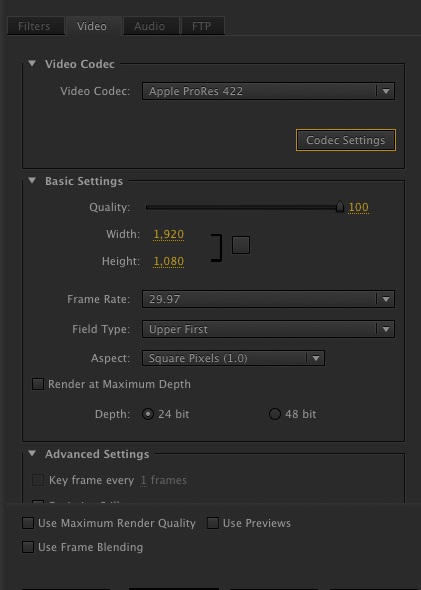
Here’s what I was doing today.

What does that equal?   Very nice realtime editing on a system that I would never expect to have so much.   Since I don’t have to convert to ProRes, I’m working with much smaller and efficient files directly off the Canon DSLR cameras.  I’m also working with Photoshop layers using opacity changes and such.   Here’s a look at a portion of the timeline.

So you’re looking at a scene from our recent Atlanta Cutters Meeting.  First, there’s two layers of 720p/59.94 HD video from a Canon DSLR.  It’s just one layer playing above the other, no picture in picture, I just lined up the two cameras.

Directly above that is the first layer of the ATL Cutters bug which is set to 15% opacity and stays up there for the entire 22 minute presentation.

Directly above is another Photoshop layer of the solid orange lower third with the solid ATL Cutters logo.

Directly above that are two layers of Premiere Pro generated text.  Ken’s name and the atlantacutters.com website.  Ken’s name has a drop shadow on it while the website layer again runs the entire 22 minutes of the presentation.

You see there’s a solid red line above the timeline so all of us who are conditioned in the Final Cut Pro mentality would expect that means the system has to render.   Not in this case.   Premiere Pro plays the timeline in full realtime, all layers playing  so I can keep editing, no stopping, no blue “Unrendered” screen.  Nothing.  Just drop the files into the timeline, pretty much any digital format, and go.

Off a single LaCie Rugged Drive connected solely by FW800 on an iMac.  Very impressive.  It’s very nice to not have to choose “Play Base Layer Only” so I can at least play the timeline for a client.  Now I can leave the entire timeline in its full format and we can just keep editing.

What’s the biggest project I’ve moved over to Premiere?  Our 2nd feature documentary, Dark Forest Black Fly, which has over 4000 clips with around 200 hours of material.   We’re in the rough cut stage and the documentary transferred over seamlessly.  The only thing that didn’t come over were the rough texts which my editor created using the “Outline Text” tool in FCP.   If she had used the regular Text Tool, then they would have transferred over as well.

I’ve read in multiple forums that “Premiere Pro has trouble with large projects.”  Based on this project transfer, I don’t see that.  Not sure how much larger of a project I can test than that.   I am definitely getting much more realtime playback in that project as well vs. what I would get in FCP, even using the ProRes codec.

Now something else Premiere Pro has is a feature called Dynamic Link which essentially allows all the apps to work together seamlessly.   Here’s a neat example of that I literally stumbled onto today.   Adobe Media Encoder is the equivalent of what you would find in Compressor.   But here’s something you would never be able to do with Compressor.

From within Adobe Media Encoder I can access Sequences from Adobe Premiere Pro projects.  “Big deal?” you say?   “I can do that from FCP by simply doing “Send To > Compressor.”   No, you can’t do this…..

I launch Adobe Media Encoder by itself.   Nothing else on the system is running.  From within Adobe Media Encoder, I select “Add Premiere Pro Sequence.”


This brings up the Adobe Premiere Projects on the right, and you can see I’ve selected the ATL Cutters July 27th mtg project which in turn brings up all the Sequences to choose from.

I can pick and choose any of these Sequences to Queue into the Media Encoder.  In fact I can select Sequences from as many projects as I need, without ever opening any of them.  This is pretty darn cool.  No need to open a project, no need to “Export” or “Send To” or even make reference movies.   The encoder works directly off the Sequence information.  A very small thing but shows just how tightly the entire suite of apps are tied together.

Add to that the fact that the current “missing features” of FCP X (including XML, OMF, audio track assignments, proper video output, capture / edit to tape controls) are already there along with the suite of products Adobe already offers, in my opinion Premiere Pro today far outperforms what FCP X can do, today.  Now if we wait 2 to 5 years (depending on which expert opinion you read) FCP X might be a really great editing tool.   But Premiere Pro and Avid will be 2 to 5 years improved as well.

So in my opinion switching to Premiere Pro today is the same as someone waiting 2 years or so for FCP X to add all the missing features.  So when FCP X does finally catch up to Premiere Pro / Avid today, they will already be two years further down the road with a wealth of input from former FCP users.  Looking forward, Premiere Pro (and Avid) has nowhere to go but further up from where it is today.

My editors are so excited about this switch that they’ve already begun training on the tool and we are going to accelerate our move to the platform.   I think we will end up with Premiere Pro being our primary editing tool with at least one, maybe two Avid Media Composers if they ever get the AJA Kona board working with that system.   And yes, I still have Smoke for Mac to play with and you never know, that might end up as a finishing system for us.

So there you go, the latest update in our new paradigm of editing for Biscardi Creative Media.  I will do a video blog this coming week on color grading in Premiere Pro.

FSI launches the affordable LM-2340W & LM-2140W

EXCLUSIVE! (always wanted to say that!)

When I get an email from Dan Desmet at Flanders Scientific asking “do you have any time available?  I’d like to show you something” I always MAKE the time.  One of the awesome benefits of being literally 15 minutes away from FSI is we get to see a lot from these guys.   It’s also a great chance to get together for lunch, or dinner in this case.

Well, what he had to show were three truly incredible monitors, one of which you already know about,the LM0950W (WOW!)  and the other two they are letting me spill the beans a day early.   FSI is releasing two new monitors at a more affordable price range for everyone.   These are 1080 Native monitors with the following standard connections: 3G/HD/SD-SDI/Component/Composite/DVI-I.    Yes, you read correctly, 3G is standard on these new monitors and these are 1080 native display monitors and they accept 4:4:4 and 2K sources.

Let me first say, my photos don’t do the monitors justice quite honestly but I was a bit rushed and took what I could.   But here’s what the 3 larger monitors look like sitting in my suite, you can ignore the old 0750W there at the bottom.

The LM-2140W and the LM-2340W are priced $2,495 and $2,995 respectively.  That’s the 2340W on the left and the 2140W on the right with the original LM-2461W in the back.   The 2461W is what I use every day in my Edit 1 suite at Biscardi Creative Media.

First off, I have to say wow, on the connectivity at this price point.  Very sweet.   Second, wow on the image.   Is it identical to the $4995 priced LM-2461W?   Well, no, but then they’re not designed to be.    These are designed to very high quality, very cost effective monitors for those who either don’t need the absolute best color critical picture of the 2461W or who simply can’t afford to drop $5,000 on a monitor right now.

When you take $2000 off the price of the top of the line 24″ model, something has to give.  In this case, the Color Fidelity Engine that powers the absolute “correctness” of the 2461W is absent in the new models.   So you will notice that the 21 and 2340W’s are slightly warmer than the 2461W.  The image displays a little more red overall and a touch of purple in the blacks.

Now comparing the 1760W to the 2140W, what you’re gaining is an extra 4″ of real estate.  Doesn’t sound like a whole lot but there’s a definite difference in terms of the viewing experience plus remember, it’s now a 1080 native display vs. the 720p native of the 1760W.   And of course FSI has gone ahead and made the 3G option (about $1,500 on the 1760W) standard on the 2140W.

Both monitors come with LED backlighting which means there is no warmup period so the colors are accurate from the time you turn them on.  This also decreases the weight dramatically as well, just 9 pounds for the 2140W, 10 for the 2340W.

Could you actually do a color grade on these monitors and submit it to a broadcaster without fear of rejection?   Well if you know what you’re doing in the color grade process, sure.   I sat there with these monitors in my suite up against the LM-2461W and it was clear that the 21 / 2340W’s were warmer as I said originally.  But, if I didn’t have the money for the 2461W or the need for absolutely color critical judgement, yeah, it would be no problem to do a nice color grade with it.  Would a broadcaster reject your work solely because you did a color grade on this monitor?  I would highly doubt it.  If they do, it would be because of the operator who did the color grade……

LM-2340W foreground, LM-2461W background

These monitors will definitely fill a great need, particularly with the economy the way it is around the world, for those of you who need a really really good monitor, but maybe not the “best” monitor.

FSI re-defined the standard of the “best” monitor out there by giving us a super high quality, color critical monitor for just $4995.   Now they’ve done the same by bringing us two incredibly good options at a much more affordable level for everyone.  Something that is “good enough” to meet your needs yet much better than other monitors at the same or even higher price point.

Keep an eye on the Flanders Scientific page tomorrow morning because not only will they announce the new 2140W and 2340W, Dan hinted you’ll find special introductory pricing too.

Small Tree Improves on Ethernet SAN* foundation

NOTE: Updated to correct the cards brought for the install.

As I reported a few weeks ago, Small Tree replaced our original ethernet SAN we’ve been running since December 2008 with a new system including an all new 48TB Granite Stor RAID II.  I also reported that we discovered some things about the Macs that Steve and Chris wanted to go back and test even further.

During the original install, the new Edge Core Switch turned out to have an issue which caused one of the 10Gig ports to fail.  But we all expected that the system would work well for us while a solution was found to that issue.  Unfortunately, though we tested the system for a full day with all the systems running and doing some editing, after the first full week, we knew we had to improve the performance of the system in a hurry.   There just seemed to be a fine tolerance to what could be happening at any given time to ensure that all the systems worked properly, particularly the ability to master shows without the edit to tape aborting for dropped frames.   It really came to a head one afternoon when we were trying to get two network shows out at the same time and of course, dropped frames turned everything into a race against the clock to make overnight shipping.    We made it, but it was way too close for comfort.

We remained in almost daily contact with Steve, Chris and the rest of the Small Tree engineering team and they repeatedly would log into our various computer systems, make some tweaks, take some notes and keep working at it.  Then last week  Steve, Chris and Corky Seeber made a return visit to our facility, but this time they brought a brand new Small Tree 10gig switch along with a quad port 10 Gb card (installed in the server to take the best advantage of the new Small Tree 10 GB switch), and 4 Single port Ethernet cards. Small Tree had noticed during testing in their offices that they were able to get better performance from the Small Tree 1 GbE cards than the internal Ethernet ports of the Apple systems when using the Small Tree 10 Gb Switch.

Basically what Small Tree has been able to do in the past is make high speed, off-the-shelf network switches work for high speed video editing.  But from what I understand we’ve hit the breaking point where if ethernet shared storage is going to continue to evolve and move forward, we need switches designed more for that task than for regular network traffic.   Enter the new Small Tree 24 Port 10Gigabit Ethernet switch.

This thing was built with complete 10GigE infrastructure within to ensure that the maximum data throughput is achieved at all times.   Designed from the ground up by Small Tree, this unit is something that should be able to withstand the constant beating that a shop like ours throws at it.  So that was step one, install the new switch to give the entire system a speed boost right off the bat.

The next step was to go through each individual computer in our facility and individually tune them further.  The first time they were here they did the first round, but since discovered some more “secret sauce” to make things work more smoothly.   They go into the Terminal of each machine and make some internal tweaks to the setup of each system.  There’s no “one setting fits all” as I found out.  Each systems has to be configured based on all the particulars of how the machine is set up including the software it runs and the third party hardware installed.   In the end, I believe Small Tree only installed one of the new 10GigE cards into the machines because quite frankly, the others didn’t need them once they were tuned correctly.

In short order we had the SAN up and running and every edit suite playing down video timelines along with all of our iMacs.  So that’s 5 Mac Pro workstations and 7 iMacs all playing 720p or 1080i ProRes video.  The Mac Pros were were all playing FCP 7 timelines in a loop and the iMacs were all playing 20 to 30 minute clips in a loop.   The iMacs don’t have editing software on them, they’re used by Producers to review footage as necessary.

Once again, the system in Edit 1 was the most vexing because it’s one of the fastest systems in the entire facility and the one we use to cut the feature documentaries, yet it would drop frames playing the same timeline that the slowest system in the shop could play with no problems.  Normally you would say “Add more Ram!”  “Add a faster GigE Card!”  and those might fix the problem temporarily.   But there was something fundamental with the way this machine was configured that needed to be addressed.  This was a super fast 8 core machine being outperformed by a much slower four core machine.  I would guess the pair of them spent about 6 hours just on that one Mac Pro but they finally hit on a combination of settings that made a major change in the behavior of the machine.   We did not touch the RAM, we did not change the Ethernet Card (A Small Tree Peg1 card that’s been in there all along), Steve and Chris simply kept going into the Terminal and making adjustments to the way the Mac Pro operates.   I honestly don’t know all the particulars but by the end of the day, the Edit 1 system was behaving better than it has in a long time.

So when we started this whole process  of moving from the older SAN configuration to the new SAN configuration we could lay off a half hour show to tape, but we would have to carefully manage what all the clients on the SAN were doing.  Even then, we could get those aborts due to dropped frames.

Now, we can literally lay off two shows simultaneously and not pay any attention to what any of the other clients are doing.  We’ve never been able to do that.  In fact we did it 4 times in a row as a test.  Two Mac Pros laying off 30 minute 720p HD shows being converted to 1080i via the AJA Kona 3, Three other Mac Pros playing 5 to 30 minute timelines in a loop or editing / scrubbing video (I was jumping from edit suite to edit suite to take over) and the 7 iMacs all playing long video clips in a loop.   In fact I even laid off 3 shows simultaneously in one test.   We’ve never been able to do any of this in the past.   Oh we could edit in all the suites at the same time no problem, but mastering two shows at the same time to tape, that’s never happened, but we always knew that and planned for it.

Then on Monday the editors came in and without any prompting, one of them said, “Everything is snappier today.”  All three of my editors noticed immediate improved performance from the system.   More realtime playback, dropped frames non-existant and absolutely no concern for mastering off shows anymore, even two at a time.   After a full week of hammering on the system, I’m glad to say that the system is proving itself on a day to day basis.

And it’s not just that we have some faster products now with the new 48TB RAID and the 10GigE switch from Small Tree.  It’s the technical experience by Steve, Chris and all the engineers at Small Tree to completely understand the inner workings of all the machines that are connected to the system.  Not accepting that we can “just throw more RAM or another card” at the problem and try to make it go away.   It’s getting to the heart of the problem, understanding it and then taking the correct course of action to solve it.  Sometimes that means adding more hardware / RAM and other times it simply means tweaking the inner workings of the system.

It’s very exciting to see what started out really as a cheaper alternative to a fibre channel SAN now evolving into a much more robust and fast system.   Oh and don’t think this is a Mac based solution, this concept can run on Windows as well, these guys have expertise in both platforms and of course Linux too.   That’s VERY important to me right now as we ponder the future course of our company and the NLE solution(s) we go with.  We have to be prepared for the possibility that a Windows workstations (or two, or three) could start appearing in our shop.   Thankfully, the guys at Small Tree will be ready to take our SAN in whatever direction we need to go.

Ok, about that * in the title – Technically what we are using is a NAS, not a SAN.  But when Bob Zelin and I first started talking about it publicly we both referred to this configuration as a SAN because that’s what we call shared storage in video production.  Steve Modica got tired of correcting us and just went along with our (incorrect) terminology.  So if you’re fussy about the correct terminology, what we are using to edit video is a NAS.  Happy now?  Good!


Transitioning: Update on our search to replace FCP

We’re one week into our search to transition our facility away from Apple and Final Cut Pro so I wanted to bring everyone up to date on where we stand so far. This was a very busy week as you can imagine with both production work in the shop and many MANY requests for myself to speak to national media outlets, podcasts and personal visits to our facility. So the testing will really ramp up this coming week.

Adobe Premiere Pro CS 5.5

This has been installed both on my home machine (27″ iMac) and our testing Mac Pro at the office which also includes the AJA Kona 3G board. Early testing shows that the workflow is remarkably similar to Final Cut Pro and in fact Adobe even includes preset keyboard remapping for Final Cut Pro 7.0 and Avid Media Composer. The new AJA 9.0.1 Plug-Ins for CS 5.5 are working very nicely and Premiere is talking to our SAN. So it’s essentially plug-and play to get going with the system.

Is it perfect? No and the Adobe reps I’ve been talking to have been very upfront about the good, the bad and ….. well nothing’s ugly so far so that’s a good thing. The most difficult part of the workflow is that Adobe might actually give us TOO many choices and settings.

For example, there is no direct equivalent to “Easy Setup” in Premiere so you do have to through several menus and settings to get your Project set up correctly. However, those Project Settings remain with the Project. So to create an “Easy Setup” you simply create multiple Project Templates with all the settings as you’d like them for various projects. So I create a “720p / 59.94 AJA Project” which has all the settings for a 720p / 59.94 project using the AJA Kona board for Capture and Playback. When I have to do a project using those parameters, I simply Duplicate the project and my entire system is set to work. That’s an elegant workaround and with the multiple workstations in our shop, I can create all the Template projects on one machine and share them with everyone else. By the way this was a great tip given by the book “An Editor’s Guide to Adobe Premiere Pro,” which you can find on various websites and even iTunes for download.

The most refreshing part of testing CS 5.5 is the openness and willingness of the Adobe team to admit that they still have things to be improved and they are listening to what editors have to say. I have heard stories of their development team literally watching the editors work through screen sharing to learn the “why” and “how” editors work in their daily sessions. That’s pretty neat.

Oh one last thing, Adobe Premiere Pro is cross platform so I have purchased one copy of Windows 7 Professional for installation in a new clean drive on our Test Mac Pro system. I want to see how this works out because this will open us up to working with freelancers and shops in town that might be Windows based, thus giving us an even larger pool of shops to work with. Much more testing to be done, but early testing has been great.

Avid Media Composer

Honestly don’t have a lot to report just yet as it is being installed on our testing Mac Pro at the facility. What we have done is to install a clean hard drive inside the machine, which we actually partitioned so we can install a clean copy of Snow Leopard on one side and the Windows 7 on the other side.

I wanted to ensure that we don’t create any issues by having Final Cut Pro, Adobe Premiere Pro CS 5.5 and Avid MC all installed on the same drive. Most folks I talked to said they always installed FCP and Avid on separate boot drives, so I followed that advice. This way if we have any issues or crashes I don’t have to wonder if anything is being caused by the other apps. So this will be installed by itself on the drive to ensure we are only testing that software, that workflow.

Of immediate concern to me is that there is no support just yet for the AJA Kona Board. Avid did hint at NAB that support is coming and a recent exchange on Twitter states that Avid is listening. So hopefully we will hear something official in the near future. Secondarily, I’m not sure how / if it will work with our Ethernet SAN. That will be even more crucial than the Kona testing. I’ve been told that Avid doesn’t like third party storage that much, so this will be a good test. The guys from Small Tree Communications happen to be coming to our shop next week so if we do have any issues, they are going to be right there to investigate.

I’m excited to be testing this out actually because this brings me full circle back to the very first NLE I learned back in 1993 / 1994 when Avid was introduced to CNN. And from my conversations with Avid at NAB 2011 and subsequent communication since, Avid is truly listening and responding to years of complaints about being a very closed and hard to work with company. As with Adobe, I’ve heard more from Avid reps since April than I ever heard from Apple in 11 years. More to report soon.

Autodesk Smoke 2012

Autodesk was kind enough to send us an evaluation copy of Smoke 2012 which is something I’ve always known about, really like the interface, but have never had the opportunity to put my hands on. It’s not installed anywhere yet as this will be the last software we’ll be testing. It’s a very new software to me to I want to spend time with Avid and Adobe first, then we’ll test Smoke. Not sure it will be the primary editor for us, but it could very well fit into a finishing role for some shows and series.

It does accept interchanges with both Adobe and Avid so I’m most interested in how well handles the myriad of codecs we get and does it like mixed timelines / mixed formats? We’ll find out soon, but I’m really REALLY excited to give this a test drive!

So that’s the basic update for the moment. On a personal note, I have to be very honest and say that the FCP X roll-out has actually made me re-think some of my overall support of Apple in general.

At a recent event (I think it was the WWDC) Apple reps said they’ve heard from many consumers that they would love to tablets to be their primary and sometimes sole computer device. Well how can that be if Apple has decreed that Flash will not be supported by the iOS devices? Sure it’s a “legacy” format and can cause “performance issues” with the tablets, but since Apple says it’s so, they don’t appear on the iOS devices and we simply accept that. With the iPhone, sure I don’t care because that’s primarily a phone, but if the iPad is supposed to be a “primary computer device,” I don’t think so.

I have visited hundreds of sites that incorporate Flash one way or another and it’s incredibly annoying when you can’t use the site, so I have to pull out one of our computers just to use that site. I hate Flash as much as Apple does, but that doesn’t mean I won’t visit a site that uses it. Try planning a cruise on your iPad, for example, and you’ll find that most major sites like Princess.com use Flash to display their cabin layouts when you go to select a cabin. Sure the world will probably be going HTML 5 soon but how many years away are we from that? In the meantime it would be nice for the iOS devices to support Flash if I as the consumer who bought the product would like to use a Flash enabled site.

With Final Cut Pro X, Apple did the same thing with third party capture cards and tape formats. Because Tape and Capture Cards don’t fit with the “modern workflow” model Apple dropped all support for them natively inside the application. Without that support for tape formats, I cannot make a living in our workflow.

The same apparently applies to “legacy projects” too. As in “You will not be able to open old projects because we say so.” Apparently Final Cut Pro X is only for “Modern Projects” and cannot be sullied by “Old Projects.”

So I gotta say, while I was really looking forward to whenever the iPad 3 comes out, I’m starting to get very annoyed with “You Can’t Do That Because We Say So” and the “You Will Do It Our Way” attitudes from Apple.

That’s not really “Thinking Different,” that’s “Telling You How To Think.”

With Final Cut Pro X, that was Apple “Telling You How To Edit Video.”

Does any of this remind of you of a certain 1984 commercial from an upstart company? Only now that upstart is directing the minions…….

I’m gonna take a close look at that new Galaxy Tab from Samsung and other tablet options out there that don’t close off part of the internet experience just “because they can.” Also going to take a really close look at Windows 7 when it’s installed on that machine because I have some hard-core Mac fans who are telling me “it’s good.”

The debacle of FCP X has caused me to “lift the blinders” that kept me focused solely on Apple and Apple development. There’s a whole new world out there and I am now open to accept the possibilities no matter where that opportunity comes from.

Transitioning 3: AJA Kona Board with Adobe CS 5.5

As we transition from Final Cut Pro to another NLE, I’m running a series of tests to determine which NLE will best suit our needs.

We have been using the AJA Kona boards for years with FCP so it’s really important to me that the board work with whatever new software we go with. Happily I can now run my AJA Kona boards smoothly with CS 5.5 thanks to the new 9.0.1 Plug-In release.

In this walkthrough I show you how to properly set up the AJA Kona board so you can do some testing yourself. It’s a little different than what I’m used to from Final Cut Pro, but this brings us one step closer to transitioning away from FCP.

Walter Biscardi, Jr. featured in Variety Magazine

This is super cool though I NEVER thought it would ever be because of video editing software.  Is there a major publication that has NOT weighed in on the Apple Final Cut Pro X product roll-out?   Well probably Home and Garden…..

Variety: Final Cut Pro update draws backlash


Apple “X” FAQs, confirmation our move away is the right one

In the wake of the scathing criticism surrounding the release of Apple Final Cut Pro X, Apple has released a FAQ that attempts to answer some of the questions.    There are a few in particular that caught my eye.

“Can I import projects from Final Cut Pro 7 into Final Cut Pro X?

Final Cut Pro X includes an all-new project architecture structured around a trackless timeline and connected clips.  Because of these changes, there is no way to “translate” or bring in old projects without changing or losing data. But if you’re already working with Final Cut Pro 7, you can continue to do so….

More than anything else, that is the complete deal breaker for us and confirms what some very smart people have been telling me all along.   In our production workflow we refer back to projects 4 to 6 years old with a need to revise, pull elements from or sometimes complete re-cut using the original elements.  While FCP X can access the media, it cannot access the original sequences and project organization.

As we have discovered, Adobe Premiere Pro opens up legacy FCP Projects very nicely and we know that we can share projects with Avid as well.

——–

“Can I edit my tape-based workflow with Final Cut Pro X?

Yes, in a limited manner. Final Cut Pro X is designed for modern file-based workflows and does not include all the tape capture and output features that were built into Final Cut Pro 7….In addition, companies like AJA and Blackmagic offer free deck control software that allows you to capture from tape and output to tape.”

Many of the documentary videographers we work with still shoot tape, predominately Panasonic DVCPro HD Tape.  The ingesting of tape is not that big of a deal using the AJA capture software, but when it comes time to output, the way this works actually is actually much more inefficient than the ability to lay out to tape directly from the timeline.  If Apple can convince every single network and station that HDCAM tape is no longer necessary, then they’d have their modern workflow, but for now, tape ingest and tape output is still here for the broadcast and much of the professional market.

Adobe and Avid support tape workflows natively.

——-

“Does Final Cut Pro X support external monitors?

Yes. If you have a second computer monitor connected to your Mac, Final Cut Pro X gives you options to display the interface across multiple monitors. For example, you can place a single window — such as the Viewer or the Event Browser — on the second monitor, while leaving the other windows on your primary monitor.”

Honestly can’t believe Apple considers this “supporting external monitors.”  This is laughable at best.  What Apple is actually doing is using my $1500 AJA Kona board and my $5,000 FSI Reference Monitor as a second computer monitor.   The video output quality is marginal at best, AJA calls it “preview quality” in their documentation.

This is NOT supporting an external monitor that I require for accurate color grading of a project.   Supporting an external monitor means allowing me to use two computers monitors via the graphics card while also sending a true video signal via my AJA Video Card (or BMD, Matrox if that’s what you have).   This FAQ in particular tells me Apple truly doesn’t “get” the professional market.

Adobe and Avid support external video displays properly.

——-

“Can Final Cut Pro X export XML?

Not yet, but we know how important XML export is to our developers and our users, and we expect to add this functionality to Final Cut Pro X. We will release a set of APIs in the next few weeks so that third-party developers can access the next-generation XML in Final Cut Pro X.”

Translation: We know it’s important to our users so we removed it from Final Cut Pro X and you’ll now have to purchase it from a third party developer.    Apparently it was so important the APIs weren’t even ready at launch.

Adobe and Avid can export XMLs natively.

UPDATE: An Avid buddy of mine told me Avid does NOT export XMLs natively.  Thanks for the info!

——

“Does Final Cut Pro X support OMF, AAF, and EDLs?

Not yet. When the APIs for XML export are available, third-party developers will be able to create tools to support OMF, AAF, EDL, and other exchange formats.”

Translation: We know it’s important to our users so we removed it from Final Cut Pro X and you’ll now have to purchase it from a third party developer.    Apparently it was so important the APIs weren’t even ready at launch.  (Is there an echo in the room?)

———

“Can I send my project to a sound editing application such as Pro Tools?

Yes; you can export your project in OMF or AAF format using Automatic Duck Pro Export FCP 5.0. More information is available on the Automatic Duck website: http://automaticduck.com/products/pefcp/.”

Wes Plate has been developing incredible plug-ins for pro users so make applications talk to each other for years when the manufacturers wouldn’t.  So what I’m about to say is not a knock against him, he is a business man and I applaud him for creating this and everything else he does for us.

This plug-in costs $495.   So my $299 investment in Final Cut Pro now increases to $794 for a single application and plug-in.

Adobe and Avid export OMFs for ProTools natively.

——-

“Does Final Cut Pro X allow you to assign audio tracks for export?

Not yet. An update this summer will allow you to use metadata tags to categorize your audio clips by type and export them directly from Final Cut Pro X.”

In Final Cut Pro 7 we simply line up the audio by dragging or assigning them to particular tracks, particularly since we send our broadcast work to ProTools.   But what if they don’t fall neatly into a particular type?  And what if I need to put this sound on Track 5 / 6 for full nat sound at this point in the show, but then I have to put it into Tracks 9 / 10 later in the show because I’m just using it underneath?   How do I “Tag” the metadata correctly.

Apple assumes that everything we do falls into neat, compartmentalized categories.  This is rare.  Particularly with documentaries when I’m dealing with 250 hours of material.   I can use the exact same clip as an Interview, Natural Sound, B-Roll and SOT.

Also note that this assignment will happen when you EXPORT the project from Final Cut Pro X.  No way for you to simply visually look at the timeline to ensure everything is correct.   What’s easier than simply looking at the timeline visually?  Apparently assigning metatags and then asking the ProTools engineer, did everything line up?   I would really like to know how many of the professional editors that made up the Beta team really thought this was a good efficient idea?

Adobe and Avid allow you to assign tracks as you’re editing within the application.

——–

So the FAQs definitely cleared up a lot of things for me.  Now I know that if I were to stay with Final Cut Pro X that I could potentially be looking at an investment of $794 to $1,000 (depending on what the cost of the third party XML plug-ins are going to cost) for a single application per machine.   With Final Cut Studio 3 I had a suite of fully functional applications that worked together (for the most part).  Now I will get a “$299″ application that rolls in some of what the old suite did, tossed out a bunch of other features & apps and I’ll have to add on OMF and XML support at the very least which will drive the price up at least $500 and possibly another $500 after that.   Of course the price can continue to rise as more features that we use today are added back in by third party developers at a cost.   This will be for each and every machine.   I’m gonna use $1,100 per machine as a nice round number on the amount of money I’d need to spend for this $300 machine that will actually make our production workflow more inefficient with the lack of tape ingest / output natively.

Let’s not forget this “modern new application” will also lock out all of my old FCP projects for good.  I have around 1,000 of them over the past 10 years.

Let’s not forget Apple discontinued sales of Final Cut Pro 7 the same day as the FCPX roll-out so I would not be able to purchase anymore at this time anyway.   Yes a limited number may still be available from VARs but why stick to an application that was “modern” two years ago and is very inefficient in digital formats.

OR

I can spend about $400 per machine and upgrade my Adobe CS 5 to CS 5.5 which gives me pretty much every single feature that Final Cut Pro 7 had and includes Adobe Premiere Pro, Adobe Photoshop, Adobe Illustrator, Adobe After Effects, Adobe Audition, Adobe Flash Catalyst, Adobe Flash, Adobe Encore (for DVD and BluRay).   In other words, a suite of products, each specialized to a set of tasks extremely well, working together.   Here’s how Steve Forde describes Adobe’s approach to ripping apart CS4, which was not well received in terms of Adobe Premiere Pro, and created a brand new 64 bit CS5.

“In CS5 Adobe had done a complete rewrite of the guts in Premiere to 64 bit on both MAC and PC, and listened to users about how the application should change – dozens of changes throughout the application to make it ‘just work’.”

They ripped apart the “guts” creating a modern 64 bit, very efficient product, but listened to the users and kept the workflow for the post production community completely intact.   Avid managed to do the same.  Only Apple decided that moving to 64 bit would require a “revolutionary approach to editing.”   

Thanks to the Final Cut Pro X FAQs, I’m convinced we have made the correct decision for my company to move away from the Final Cut Pro platform.  It’s clear that Apple will stick to their path with no looking back while I just need a more efficient tool that fits into our workflow.  Moving to Adobe and Avid will allow us to continue our jobs without an upheaval in the way we tell stories.

Quite honestly we’re all excited about the possibilities moving forward!


AJA releases 9.0.1 Plug-In for Adobe CS 5.5

Today AJA Video Systems released the Kona 9.0.1 Plug-In for Adobe CS 5.5.   What this does is allow you to send your video output from Adobe Premiere and After Effects to an external monitor.

I’ve heard from many of you that video playback has been out of sync in the past with CS5 and the AJA Kona.  I can tell you that I had perfectly sync’d playback today when testing out this latest release. We’re running the Kona 3G board on our test system feeding a Flanders Scientific LM-2461W to our Genelec sound system.   Everything was looking really good and in perfect sync.

I’ll post a video blog showing how to properly set yourself up for CS 5.5 playback for those of you transitioning over from Final Cut Pro or any other NLE.

You can download the AJA Plug In here. Scroll down to “Optional and Utilities.”